🔥 git tag
Git에서는 특정 커밋에 이름을 붙여 쉽게 참조할 수 있는 방법을 제공하는데, 이를 태그(tag)라고 합니다. 태그를 사용하면 중요한 커밋을 찾기 쉬워지고, 버전 관리가 훨씬 수월해집니다.
태그 생성하기
git tag 명령어를 사용하여 새로운 태그를 만들 수 있습니다. 태그를 만들 때는 태그 이름과 함께 어떤 커밋에 태그를 붙일 것인지 지정해야 합니다.
# 현재 HEAD가 가리키는 커밋에 v1.0 태그 생성
git tag v1.0# 현재 HEAD가 가리키는 커밋에 v1.0 태그 생성
git tag v1.0특정 커밋에 태그를 붙이기 위해서 git log로 커밋 해시를 확인하면 편리하겠죠?
$ git log --oneline --graph --decorate --all
* 1ba1d9b (HEAD -> feature/signup) Update README.md
* 2fa353f Delete README.md
* caf90de (main, feature/login) Update README
| * aec5901 (refs/stash) WIP on (no branch): 070ebac Initial commit
|/|
| * 2443c91 index on (no branch): 070ebac Initial commit
|/
* 070ebac Initial commit
* 713d307 Update hello.txt
* 160ea51 Add message
* 9c5b645 Add hello.txt
* fe5b5e0 (origin/main, origin/HEAD) update README.md
* 103d6c8 (origin/develop) Initial commit$ git log --oneline --graph --decorate --all
* 1ba1d9b (HEAD -> feature/signup) Update README.md
* 2fa353f Delete README.md
* caf90de (main, feature/login) Update README
| * aec5901 (refs/stash) WIP on (no branch): 070ebac Initial commit
|/|
| * 2443c91 index on (no branch): 070ebac Initial commit
|/
* 070ebac Initial commit
* 713d307 Update hello.txt
* 160ea51 Add message
* 9c5b645 Add hello.txt
* fe5b5e0 (origin/main, origin/HEAD) update README.md
* 103d6c8 (origin/develop) Initial commit# 특정 커밋에 태그 생성 (커밋 해시 사용)
git tag v0.9 caf90de# 특정 커밋에 태그 생성 (커밋 해시 사용)
git tag v0.9 caf90de다시 로그를 출력해 보면 caf90de 커밋에 태그 v0.9 가 설정된 것을 알 수 있습니다.
$ git log --oneline --graph --decorate --all
* 1ba1d9b (HEAD -> feature/signup, tag: v1.0.0, tag: v1.0) Update README.md
* 2fa353f Delete README.md
* caf90de (tag: v0.9, main, feature/login) Update README
| * aec5901 (refs/stash) WIP on (no branch): 070ebac Initial commit
|/|
| * 2443c91 index on (no branch): 070ebac Initial commit
|/
* 070ebac Initial commit
* 713d307 Update hello.txt
* 160ea51 Add message
* 9c5b645 Add hello.txt
* fe5b5e0 (origin/main, origin/HEAD) update README.md
* 103d6c8 (origin/develop) Initial commit$ git log --oneline --graph --decorate --all
* 1ba1d9b (HEAD -> feature/signup, tag: v1.0.0, tag: v1.0) Update README.md
* 2fa353f Delete README.md
* caf90de (tag: v0.9, main, feature/login) Update README
| * aec5901 (refs/stash) WIP on (no branch): 070ebac Initial commit
|/|
| * 2443c91 index on (no branch): 070ebac Initial commit
|/
* 070ebac Initial commit
* 713d307 Update hello.txt
* 160ea51 Add message
* 9c5b645 Add hello.txt
* fe5b5e0 (origin/main, origin/HEAD) update README.md
* 103d6c8 (origin/develop) Initial commit태그를 만들 때는 주석(annotation)을 함께 추가할 수도 있습니다. 주석을 포함한 태그를 만들려면 -a 옵션을 사용하면 됩니다.
# 주석과 함께 태그 생성
git tag -a v1.2 -m "Release 1.2"# 주석과 함께 태그 생성
git tag -a v1.2 -m "Release 1.2"태그 조회하기
git tag 명령어를 아무 옵션 없이 사용하면 저장소에 존재하는 모든 태그의 목록을 확인할 수 있습니다.
git taggit tagv0.9
v1.0
v1.0.0
v1.2v0.9
v1.0
v1.0.0
v1.2만약 특정 패턴에 맞는 태그만 찾고 싶다면 git tag -l 명령어와 함께 패턴을 지정하면 됩니다.
git tag -l "v1.*"git tag -l "v1.*"v1.0
v1.0.0
v1.2v1.0
v1.0.0
v1.2태그 정보 확인하기
git show 명령어를 사용하면 특정 태그가 가리키는 커밋의 상세 정보를 확인할 수 있습니다.
git show v1.2git show v1.2tag v1.2
Tagger: CodingMax <biz.codingmax@gmail.com>
Date: Fri Mar 29 22:58:17 2024 +0900
Release 1.2
commit 1ba1d9b62f5637f5634354a4f9dd81d23f2057c0 (HEAD -> feature/signup, tag: v1.2, tag: v1.0.0, tag: v1.0)
Author: CodingMax <biz.codingmax@gmail.com>
Date: Fri Mar 29 22:11:29 2024 +0900
Update README.md
diff --git a/README.md b/README.md
new file mode 100644
index 0000000..5852f44
--- /dev/null
+++ b/README.md
@@ -0,0 +1 @@
+Initial committag v1.2
Tagger: CodingMax <biz.codingmax@gmail.com>
Date: Fri Mar 29 22:58:17 2024 +0900
Release 1.2
commit 1ba1d9b62f5637f5634354a4f9dd81d23f2057c0 (HEAD -> feature/signup, tag: v1.2, tag: v1.0.0, tag: v1.0)
Author: CodingMax <biz.codingmax@gmail.com>
Date: Fri Mar 29 22:11:29 2024 +0900
Update README.md
diff --git a/README.md b/README.md
new file mode 100644
index 0000000..5852f44
--- /dev/null
+++ b/README.md
@@ -0,0 +1 @@
+Initial commit태그 공유하기
로컬 저장소에서 만든 태그는 자동으로 원격 저장소에 전송되지 않습니다. 따라서 다른 사람과 태그를 공유하려면 명시적으로 태그를 원격 저장소에 푸시해야 합니다.
# 특정 태그를 원격 저장소에 푸시
git push origin v1.2

# 모든 태그를 원격 저장소에 푸시
git push origin --tags# 특정 태그를 원격 저장소에 푸시
git push origin v1.2
# 모든 태그를 원격 저장소에 푸시
git push origin --tagsEnumerating objects: 22, done.
Counting objects: 100% (22/22), done.
Delta compression using up to 6 threads
Compressing objects: 100% (14/14), done.
Writing objects: 100% (20/20), 1.69 KiB | 864.00 KiB/s, done.
Total 20 (delta 6), reused 0 (delta 0), pack-reused 0
remote: Resolving deltas: 100% (6/6), completed with 1 local object.
To github.com:codingmax-tube/git-commands-cookbook.git
* [new tag] v0.9 -> v0.9
* [new tag] v1.0 -> v1.0
* [new tag] v1.0.0 -> v1.0.0
* [new tag] v1.2 -> v1.2Enumerating objects: 22, done.
Counting objects: 100% (22/22), done.
Delta compression using up to 6 threads
Compressing objects: 100% (14/14), done.
Writing objects: 100% (20/20), 1.69 KiB | 864.00 KiB/s, done.
Total 20 (delta 6), reused 0 (delta 0), pack-reused 0
remote: Resolving deltas: 100% (6/6), completed with 1 local object.
To github.com:codingmax-tube/git-commands-cookbook.git
* [new tag] v0.9 -> v0.9
* [new tag] v1.0 -> v1.0
* [new tag] v1.0.0 -> v1.0.0
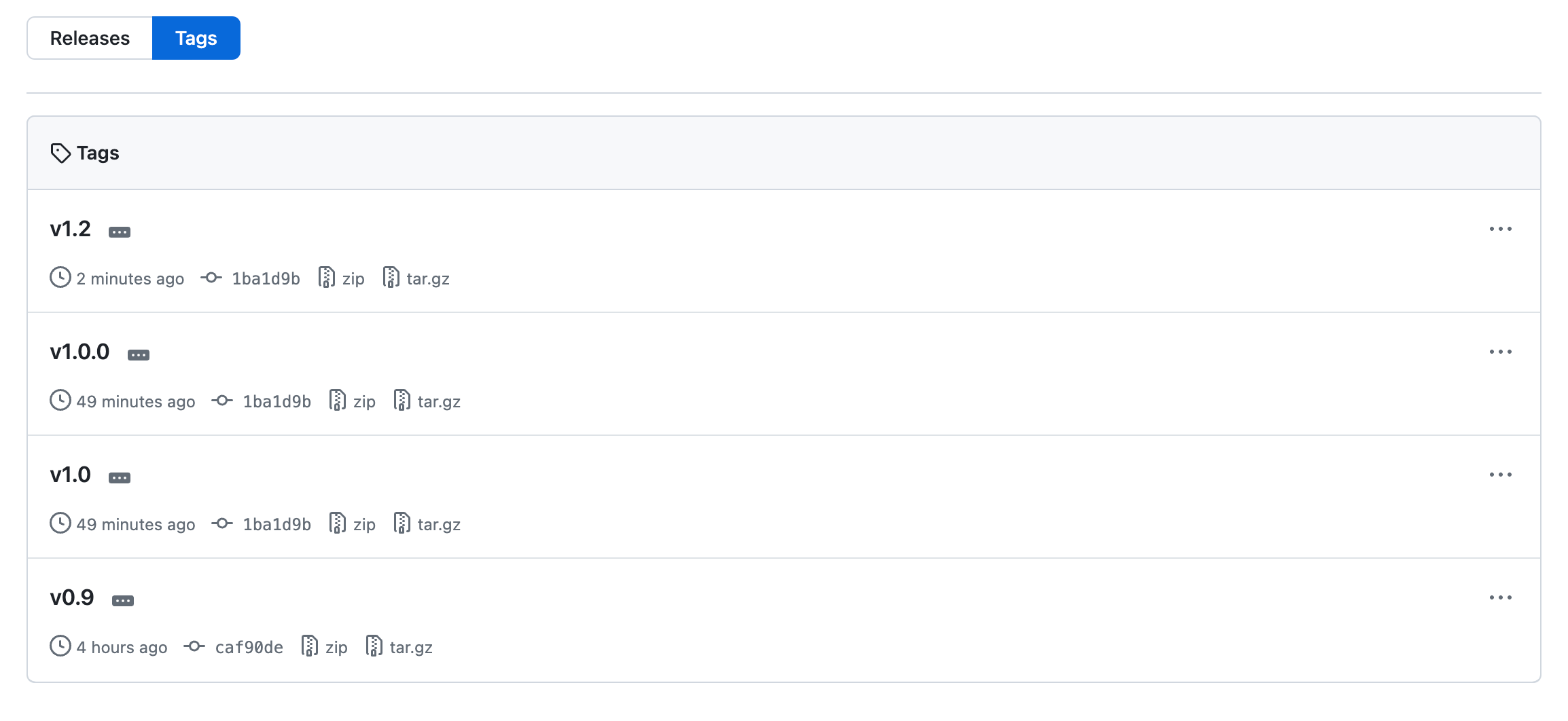
* [new tag] v1.2 -> v1.2이렇게 하면 아래 그림처럼 원격 저장소에도 태그가 생성되어 다른 사람들과 쉽게 공유할 수 있게 됩니다.
다음은 태그 사용의 예시를 보여주는 다이어그램입니다.
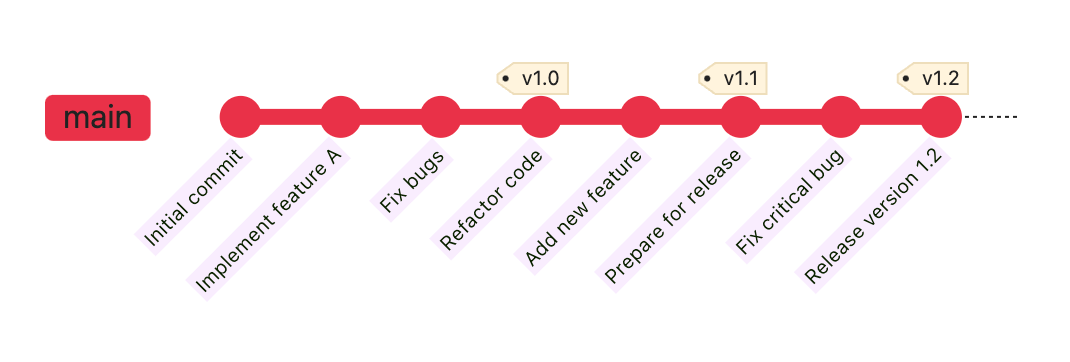
위 다이어그램에서 볼 수 있듯이, 중요한 커밋마다 적절한 태그를 붙여주면 커밋 히스토리를 한 눈에 파악하기가 훨씬 쉬워집니다. 또한 특정 버전을 쉽게 참조할 수 있어 버전 관리와 배포 과정이 간편해집니다.
YouTube 영상